
MCP meets Xen Orchestra
Talk to your infrastructure in plain language, get instant answers, and keep everything on-prem if you want.


With XO 6.2, we shipped something we've been excited about for a while: native support for the Model Context Protocol (MCP). Not a third-party plugin, not a community experiment: @xen-orchestra/mcp is a first-party module maintained by the Vates team as part of the Xen Orchestra codebase.
It's a small package, but it opens up a fundamentally new way of interacting with your virtualization stack: instead of clicking through dashboards or writing API calls, you can now ask questions in plain English (or French, or any language your AI assistant understands) and get instant, accurate answers drawn directly from your live infrastructure.
And if you want to go further (like running the AI model itself on your own GPUs, inside your own VMs, with zero external dependency) you can do that too. We'll get to that!
Let's walk through what this looks like in practice.
🔌 A 30-second recap: what is MCP?
MCP is an open standard, originally introduced by Anthropic and now governed by the Linux Foundation's Agentic AI Foundation. Think of it as a universal adapter between AI assistants and external systems. It's supported by Claude, ChatGPT, Gemini, and many others — so you're not locked into any single vendor.
When you install the @xen-orchestra/mcp package and point it at your XO instance, your AI assistant gains the ability to query your pools, hosts, VMs, and documentation: all through a structured, secure interface. Because this is an official Xen Orchestra module, it follows our REST API directly, benefits from the same release cycle, and is covered by Vates support contracts. You're not depending on a third-party integration that might break on the next update.
One important design choice: everything is read-only. The MCP server can look at your infrastructure, but it can't modify anything. You get the benefits of AI-assisted workflows without ever worrying about a chatbot accidentally shutting down your production VMs.
⚡ Getting started in 2 minutes
npm install -g @xen-orchestra/mcp
Then add the MCP server to your AI client (Claude Desktop, Claude Code, etc.) with your XO credentials. That's it. Full setup instructions are in our documentation.
Now, let's look at the use cases that make this genuinely useful.
💡 What can you actually do with it?
The best way to understand MCP is to see it in action. Below are real scenarios where talking to your infrastructure replaces clicking, scripting, or context-switching. None of them require writing code, just a question in plain language.
The Monday morning infrastructure check
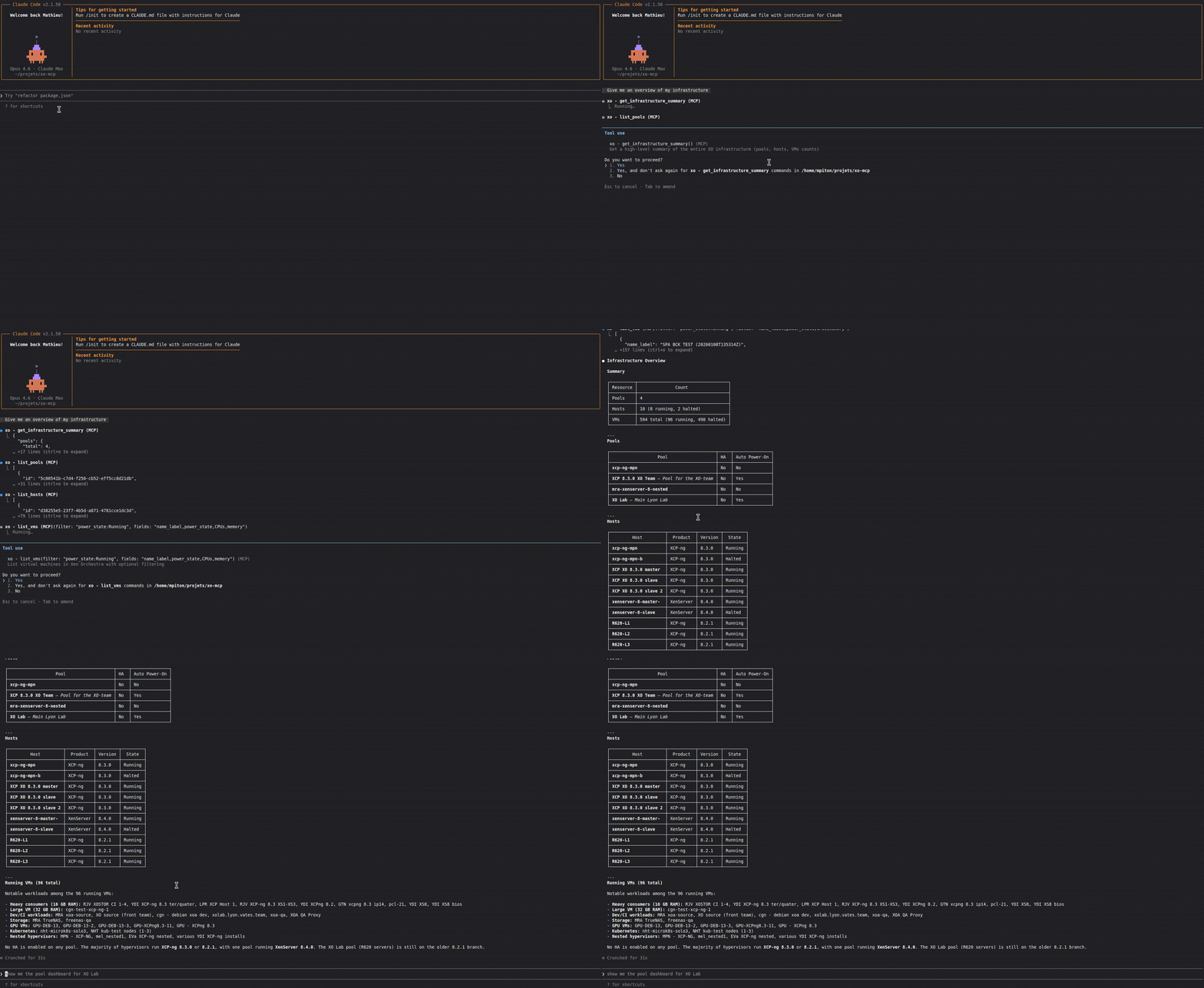
It's 8:30 AM. Coffee in hand. Instead of opening three tabs and clicking through your pool dashboard, you type:
"Give me a full overview of my infrastructure. Are there any VMs that are down that shouldn't be?"
The assistant calls get_infrastructure_summary, fetches pool details, host counts, and VM states. Within seconds, you get back something like:
"You have 2 pools with 8 hosts total. 142 VMs are running, 12 are halted. The halted VMs include webfront-03, monitoring-secondary, and db-staging-replica — these were running last Friday."
You didn't open a single dashboard. You didn't write a single query. You just asked.
Quick triage during an incident
Your monitoring fires an alert: app-server-12 is behaving strangely. You need details, fast. Instead of navigating to the VM detail page, you type:
"What's the current state of app-server-12? What host is it running on, how much memory is allocated, and when was the last snapshot?"
The assistant calls list_vms with a name filter, then get_vm_details on the result. In one conversational exchange, you get the VM's power state, resource allocation, host placement, tags, and snapshot history.
During an incident, seconds matter. This is faster than any GUI could ever be.
Capacity planning conversations
You're in a meeting and someone asks: "Do we have room to deploy 20 more VMs on the production pool?"
You don't need to leave the conversation. You pull up your assistant and ask:
"Show me the dashboard for the production pool. What's the current CPU and memory utilization across hosts?"
The assistant calls get_pool_dashboard, which returns an aggregated view including host status, top resource consumers, and active alarms. You can follow up with:
"Which hosts have the most available memory right now?"
And you get a sorted answer, in natural language, that you can share with your team on the spot. No spreadsheets, no CLI — just a conversation.
Onboarding a new team member
A new sysadmin joins your team. Instead of bookmarking 15 doc pages, you tell them:
"Just ask the assistant. It knows how to search the XO documentation too."
They can type things like:
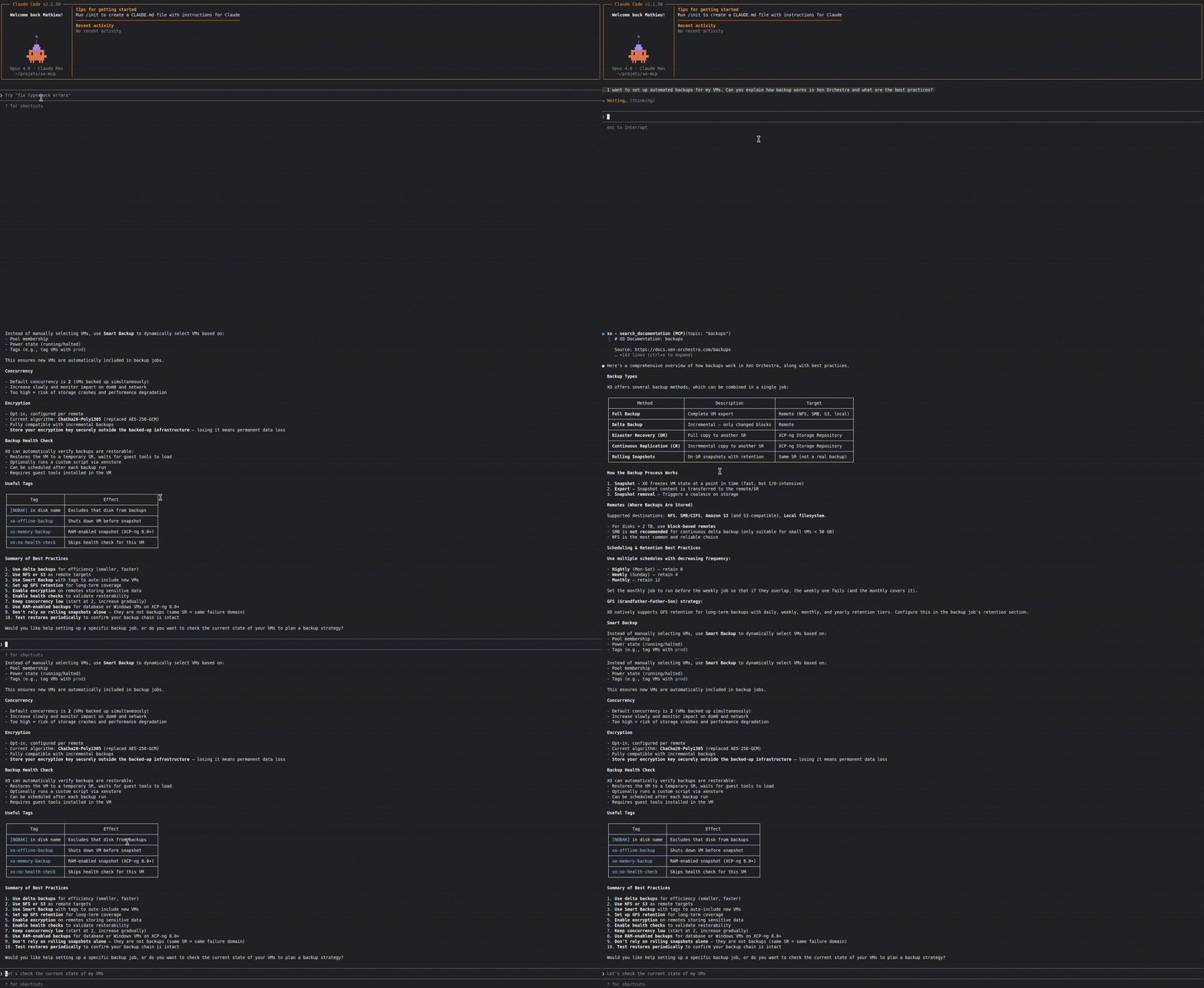
"How do I configure incremental backups in XO?"
"What's the difference between disaster recovery and continuous replication?"
"How do I set up the SDN controller?"
The search_documentation tool lets the assistant pull relevant sections of XO docs by topic: backups, REST API, installation, users, troubleshooting, and more. It turns the AI assistant into a context-aware onboarding companion that already knows your stack.
The executive summary you never have time to write
Your manager wants a weekly infrastructure summary for the ops review. Instead of manually compiling it, you ask:
"Give me a summary of our infrastructure I can paste into our weekly ops report. Include pool names, total hosts, running vs. halted VMs, and flag anything unusual."
The assistant calls get_infrastructure_summary and get_pool_dashboard for each pool, then composes a structured report. You copy, paste, and you just saved 20 minutes every week.
Better yet: if your AI assistant is connected to other MCP servers (Slack, Matrix, or any messaging platform), you can skip the copy-paste entirely:
"Send this summary to the #ops-weekly channel on Slack."
One prompt, zero context-switching. The infrastructure report goes from your XO instance to your team's chat without you touching a clipboard.
Cross-referencing VMs with naming conventions
Large environments often rely on naming conventions to identify workload types, environments, or owners. Now you can query them semantically:
"List all VMs with 'staging' in their name. How many are running vs. stopped?"
"Show me all VMs that start with 'k8s-worker'. Which pool are they in?"
"Do I have any VMs with 'test' in the name that have been running for more than a week?"
The list_vms tool supports filter expressions and wildcards like name_label:staging*, and the assistant can combine multiple calls to build a richer picture. This turns naming conventions into a queryable inventory system.
Pre-migration sanity checks
Before migrating VMs between hosts or pools, you want to validate the target environment. Ask:
"What's the status of all hosts in pool 'datacenter-west'? Any hosts in maintenance mode? What's the memory pressure like?"
The assistant uses list_hosts with pool filtering and get_pool_dashboard to give you a clear picture before you commit to the migration. You can follow up naturally:
"Which host in that pool has the lightest workload right now?"
This kind of pre-flight check used to require multiple CLI commands or dashboard views. Now it's a two-sentence conversation.
Audit and compliance quick checks
When audit season comes around, or when you simply want a quick compliance check:
"How many VMs are running across all pools? Do any hosts have HA disabled?"
"List all pools and tell me which ones have auto power-on enabled."
The assistant queries list_pools with the right fields and gives you a formatted answer. You're not building reports — you're asking questions and getting answers.
🏠 Your own AI, on your own infrastructure
Everything above assumes you're using an external AI assistant — Claude Desktop, ChatGPT, or similar. But here's where it gets really interesting: you can run the AI itself on XCP-ng too.
We published a detailed tutorial last year on running GPU-powered LLMs with XCP-ng. The short version: thanks to PCI passthrough, you can assign a physical GPU directly to a VM and get near bare-metal performance for AI inference. Install Ollama, pull a model, and you have a fully private LLM running inside your virtualization stack.
The open-source model ecosystem is thriving. You can run any of these locally, depending on your hardware:
- DeepSeek R1 — strong reasoning capabilities, available in multiple sizes
- Llama 3 (Meta) — one of the most versatile open model families
- Mistral and Mixtral (Mistral AI) — excellent performance-to-size ratio, especially for European teams
- Qwen 3.5 (Alibaba) — competitive multilingual performance
- Gemma 2 (Google) — lightweight and efficient
- Phi-4 (Microsoft) — surprisingly capable for its size
- Command R+ (Cohere) — strong at RAG and tool use
Pair any of these with Open WebUI for a polished chat interface, and you have a private AI assistant that rivals cloud offerings — running entirely on hardware you control.
Why VM isolation matters for AI agents
This is more than a convenience play. As AI agents become more capable: reading data, calling tools, making decisions… The question of where your data goes becomes critical.
When you use a cloud-hosted AI with MCP, your infrastructure metadata flows through a third-party service. For many teams, that's fine. But for regulated industries, sovereign infrastructure requirements, or simply organizations that take data control seriously, it's a non-starter.
Running your LLM inside a VM on XCP-ng gives you something unique: hardware-level context isolation. The Xen hypervisor enforces strict boundaries between VMs. Your AI agent runs in one VM, your production workloads run in others, and the hypervisor ensures they can never cross-contaminate. There's no shared kernel, no container escape risk — just clean, hardware-enforced separation.
This turns your virtualization stack into a sealed AI execution environment:
- Your model weights stay on your hardware
- Your infrastructure queries never leave your network
- Your prompts and responses are never sent to any external API
- The VM boundary acts as a hard context seal — your AI agent can only see what you explicitly expose through MCP
In the era of AI agents that can chain tool calls, browse documentation, and summarize entire infrastructures, this kind of isolation isn't paranoia at all.
The full control loop
Put it all together and you get a remarkably self-contained setup:
- XCP-ng hosts your entire virtualization infrastructure
- A GPU-equipped VM runs your open-source LLM via Ollama
- The XO MCP server connects that LLM to your Xen Orchestra instance
- You ask questions in natural language, and everything stays on-prem
Your AI talks to your infrastructure manager, which manages your hypervisor, which hosts your AI. It's a closed loop: no cloud dependency, no data exfiltration risk, full sovereignty.
For organizations that are building private clouds, running air-gapped environments, or simply want to keep their infrastructure metadata out of third-party hands, this is exactly the kind of stack that makes it possible to adopt AI without compromise.
🔒 Safe by design
It's worth reiterating: the XO MCP server is read-only. It can list, query, and summarize — but it cannot start, stop, migrate, or delete anything. This was a deliberate choice. We want this to be a tool you feel comfortable enabling on production environments from day one.
Your AI assistant can look at your infrastructure all it wants. It just can't touch it.
🔭 What's next
This is just the beginning. The current set of tools covers the most common read operations: pools, hosts, VMs, dashboards, documentation. But the architecture is modular. As the REST API grows (and it keeps growing, as you saw in XO 6.2 with new endpoints for migrations, VDIs, and VIF rules), the MCP surface area will grow with it.
We're also watching the MCP ecosystem closely. Now that the protocol is governed by the Linux Foundation and supported by every major AI provider, the tooling around it is maturing fast. The possibilities for infrastructure automation, multi-system orchestration, and AI-assisted operations are only expanding.
🚀 Try it now
If you're running XO 6.2, you can set this up in minutes:
npm install -g @xen-orchestra/mcp- Configure it with your XO credentials
- Add it to OpenWebUI, Claude Desktop, Claude Code, or any MCP-compatible client (Cursor, Cline, Gemini CLI, ChatMCP…)
Full instructions: docs.xen-orchestra.com/mcp
Talk to your infrastructure. It's ready to answer!